
Android fitness and workout games (2026)
Four Android fitness games led by Pushup RPG: how on-device camera pose detection and step counters work, what is free, and which permissions they need.
In our guide to offline Android games, we looked at how switching from touchscreen buttons to a Bluetooth controller transforms action titles like Dead Cells. Android fitness and workout games push that idea even further: they use your phone’s front camera, GPS, or pedometer to turn your own body into the controller.
1. Pushup RPG: home calisthenics where the front camera counts every attack
Most workout apps run on the honor system: you type in a rep count and the app takes your word for it. Pushup RPG (free on Google Play with full details at pushup.quest) removes the guesswork by turning your front camera into the referee of a role-playing game. You prop your phone up, step back into frame, and its on-device pose detection measures movement depth in real time so only full-range reps count.

The camera reads six movements on-device with no smartwatch or external sensor required:
- Combat and leaderboards: pushups (standard, knee pushups via the selectable Knee pushups mode, diamond, wide, or decline) and squats act as your weapons. Every rep detected by the camera triggers an attack that deals damage to the enemy, earns XP, and drops loot.
- Solo Training mode: adds sit-ups (counted by reps), the plank (timed in seconds), pull-ups (reps), and dips (reps). These four training modes keep your daily streak alive on days when you want to work different muscle groups.
Progression is built like a full RPG: a main campaign of 48 monsters across 8 biomes, character classes, a skill tree, daily quests, and 40-second live duels in the Arena that match you against a player at a similar rep pace with both cameras counting simultaneously and no chat. Leaderboards cap daily scores at 300 reps to keep competition honest, while a built-in streak freeze and guided rest days prevent overtraining.
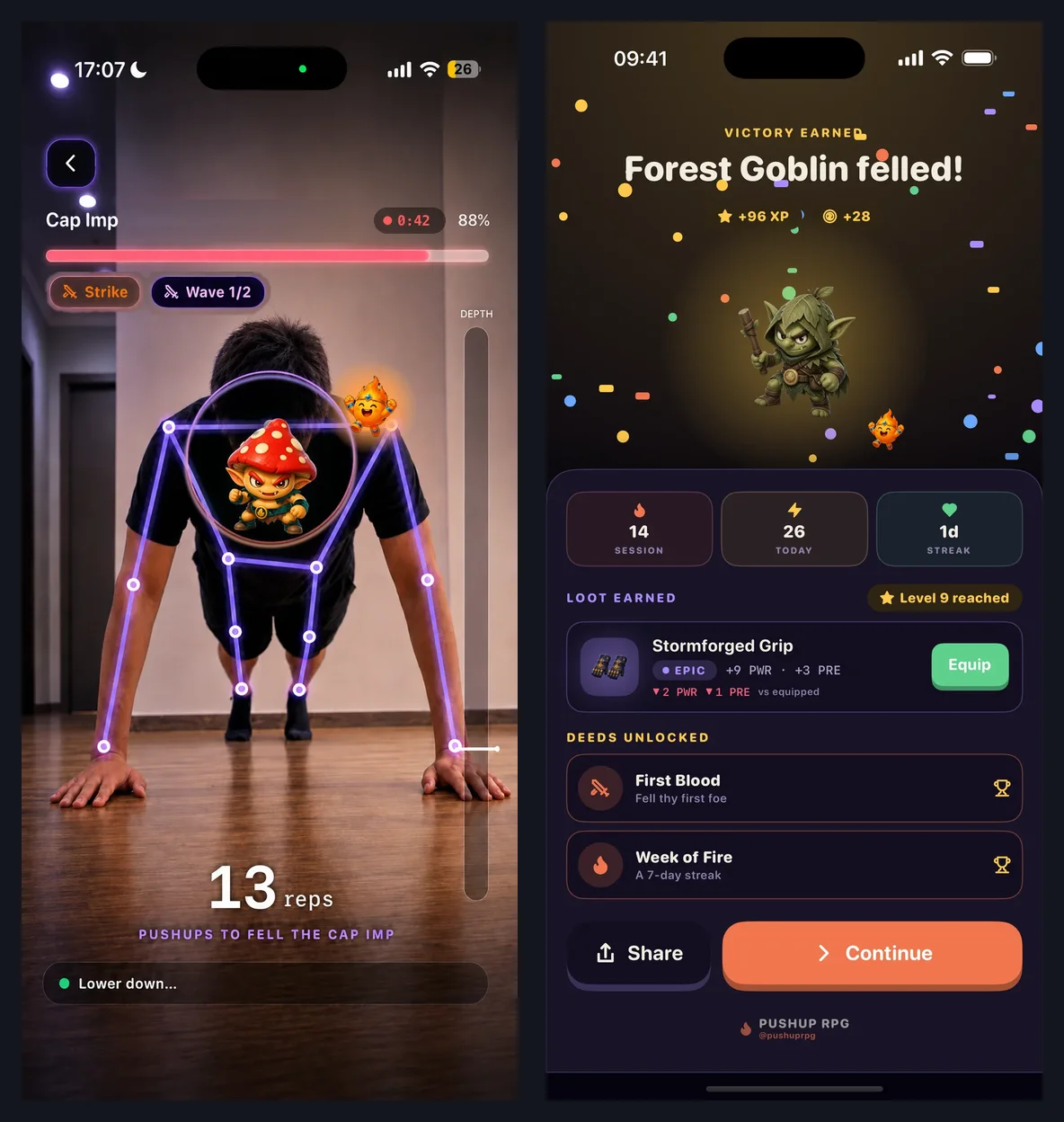
Pushup RPG in action: live camera rep counting during battle and the victory workout summary with loot drops
Here is how free content and optional in-app purchases break down on Android:
- What is free: downloading the game, completing the entire main campaign, using Training mode across all six movements, fighting in the Arena, and joining a guild cost nothing.
- What in-app purchases unlock: the optional Vigil membership unlocks extras such as founding your own guild and pushing past floor 10 in Endless Descent. Separate gem packs add in-game currency, though you can progress through and beat the campaign without buying them.
From a privacy standpoint, rep counting happens entirely on-device: neither camera video nor pose landmarks are uploaded to any server.
2. Zombies, Run!: outdoor or treadmill cardio with an interactive audio drama
If you prefer outdoor running or brisk walking over floor calisthenics, Zombies, Run! turns any cardio session into an episodic audio adventure. Put on your headphones, tap Start Run, and you step into the shoes of Runner 5, venturing out from Abel Township to gather medical supplies, batteries, and ammo while evading infected hordes.

The app weaves voice-acted story dispatches directly between tracks from your own music or podcast app. As you move, an audio alert announces every supply item your character picks up automatically based on distance tracked via GPS (outdoors) or the accelerometer (when you select Simulate Running for indoor treadmill sessions).
Its signature mechanic is the Zombie Chases toggle: enable it before starting a mission and warning beeps will occasionally announce a nearby horde. When that happens, you have to increase your real-world pace by roughly 20% for 60 seconds; slow down and your character drops part of your hard-earned supplies to distract the zombies. Back at base, you spend those materials to expand Abel Township’s defenses. You can play for free by unlocking story missions progressively, while the optional Abel Runner’s Club membership unlocks all 500+ missions and interval training modes at once.
3. Pikmin Bloom: turning daily walks into low-screen expeditions
Not everyone wants high-intensity pushup sets or interval sprints. For players who simply want to walk more throughout the day without staring at the screen—unlike many location-based titles in our roundup of top free Android games—Pikmin Bloom runs almost entirely with your phone in your pocket.

Built by Niantic and Nintendo, the game reads Android’s system step counter in the background and turns your daily commute into three core loops:
- Grow seedlings: every planter pot you find takes between 1,000 and 10,000 real steps in your backpack slot to pluck a new Pikmin.
- Plant flowers along your route: tapping Plant Flowers before you head out leaves a trail of petals along the streets you walk, speeding up seedling growth and blooming giant flowers at local landmarks.
- Expeditions and weekly challenges: once you finish your walk, you dispatch your squad to retrieve fruit and postcards discovered along the way, or team up with friends for 30,000- and 100,000-step weekly challenges.
The core game is free to play, with optional purchases limited to extra storage slots for Pikmin, petals, or single-use planter slots.
4. Walkr: galactic exploration powered by your phone’s pedometer
For players who enjoy management and collection games where you normally wait hours for build timers to finish, Walkr: Fitness Space Adventure replaces waiting with real steps measured by Android’s accelerometer.

Every step you take during the day converts into walking energy stored in your ship’s tank. When you open the app in the evening, you spend that banked energy to speed up discovery across 100+ planets, feed creatures across your star system, and complete cooperative Epics alongside a fleet of other players. The entire planet-discovery loop is free, with optional energy cube packs and cosmetic ship upgrades.
Comparison of Android fitness and workout games
| Game | Workout & sensor used | What is included free | Optional purchases |
|---|---|---|---|
| Pushup RPG | Strength & calisthenics · Front camera (on-device pose AI) | Full 48-monster campaign, 6 movements, Arena duels, joining a guild | Vigil membership (found a guild & floor 10+ in Endless Descent) and gem packs |
| Zombies, Run! | Running or brisk walking · GPS or treadmill accelerometer | Base building and progressive story mission unlocks | Abel Runner's Club subscription for all 500+ missions and extra modes |
| Pikmin Bloom | Daily walking · Pedometer and background location | Full game loop, seedling growth, flower planting, weekly challenges | Storage upgrades, radar detectors, single-use planter slots |
| Walkr | Daily steps · Background accelerometer | 100+ planet exploration and cooperative Epics missions | Energy cube bundles and optional spacecraft designs |
All four titles are free to download on Google Play and allow full progression without mandatory purchases.
Phone placement, permissions, and common Android workout fixes
To keep camera rep counting accurate and stop Android from pausing step tracking in your pocket, check these three settings before your first session:
- Framing and lighting in Pushup RPG: prop your phone on the floor leaning against a wall or stand about 1 to 1.5 meters (3–5 feet) away so the front camera sees your shoulders, arms, and hips clearly. Avoid bright windows directly behind you, and note that wall pushups will not register because your torso stays too upright to read as a plank—if you are building up strength, select Knee pushups mode before starting the battle.
- Step counters freezing when the screen locks: skins such as HyperOS, One UI, and ColorOS aggressively suspend background sensors to save battery. For Pikmin Bloom, Walkr, or Zombies, Run!, long-press the app icon → App info → Battery and select Unrestricted. If you also train with a smartwatch, link your activity data using our Wear OS and Health Connect guide.
- Auditing camera and location permissions: a calisthenics game only needs camera access set to While using the app, never in the background. You can inspect a 24-hour timeline of which games accessed your camera, microphone, or GPS at any time under Settings → Security and privacy → Privacy dashboard, as covered in our Android privacy dashboard and permissions guide.