AGI on Android: testing the local AI agent and its MCP
The AGI app is not another chatbot: it is an agent that touches your screen for you. We installed it on Android and tested it with a real task. Here is how AGI-0 works, why its AGI-RUN engine flies on the Snapdragon 8 Elite, and what privacy and reliability limits it has.
What is AGI for Android and how does it control your apps without APIs
AGI, Inc. is an AI lab founded in San Francisco in 2025 by Div Garg (creator of MultiOn, the pioneer of browser agents), his brother Naman Garg, and Steve Frey. Its advisors include Rich Miner, co-founder of Android. The app is free to download on Google Play, has in-app purchases, around 20,000 downloads, and its current version is 2.14.0.
Under the hood there is no conventional chat model: there is AGI-0, a family of action models from 2B to over 20B parameters trained to see a screen, plan steps, and execute them. The assistant is called Iris and has two modes: Home, for chatting, and Do, for acting.
The key is that it does not depend on each app’s APIs. It reads what is on screen (a screenshot and Android’s accessibility tree) and acts through the Accessibility Service, also using the overlay permission to show you notices on top of other apps. That is why it can operate any installed app: WhatsApp, Uber, system settings, or your bank. Initial sign-up needs a connection; after that, some of the work can continue offline.
How to install and set up AGI on Android
- Install AGI from Google Play: it is free, with in-app purchases, and the current version is 2.14.0.
- Complete the initial sign-up: it needs an internet connection.
- Grant the Accessibility and overlay permissions when the app asks for them: those are what let it read the screen and act.
- Pick a mode: Home to chat with Iris, or Do to run tasks.
- Try a simple task first and watch the confirmations: before sensitive actions such as updates or payments, the agent stops and asks for permission.
If you want to control the phone from your computer, the MCP section below explains how to connect it.
Our real-world test: from “all up to date” to asking for confirmation
To measure it in real conditions, we asked Iris: “Check for updates of all installed apps and list any pending.” Its answer was blunt: “All apps are up to date. There are no pending updates in the Google Play Store.”
Right after, we checked the Google Chrome listing in Play Store and there was an update available. The agent detected it while navigating the screen and stopped with the notice “AGENT NEEDS CONFIRMATION: Confirm updating Google Chrome?”, waiting for our No or Yes.
The reading is double. On one hand, the first check failed: a typical false negative of agents that operate interfaces, because the menu path or Play Store’s language throws the model off. On the other, human control worked: before touching the Update button, the agent asked for permission and an amber veil marked on screen that it was the one operating. That brake is what makes a technology that still makes mistakes tolerable.
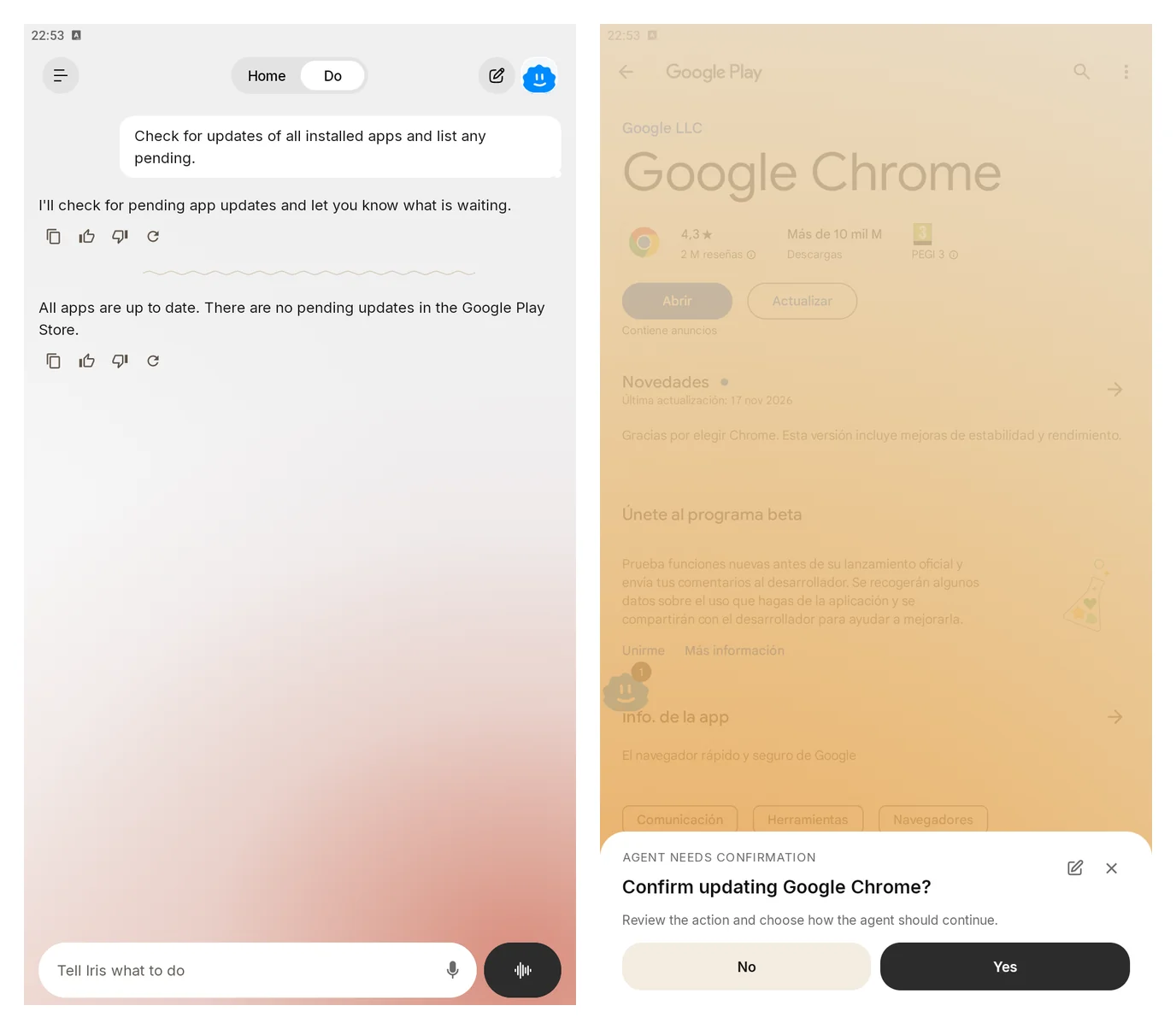
Real AGI test: Iris says there are no updates and, on the right, the confirmation to update Chrome
AGI-RUN on Snapdragon 8 Elite: up to 9.9× faster
To make the agent respond fast on a phone, the company built AGI-RUN, its local inference engine. It does not just quantize the model: it compiles it to low-level hardware instructions and splits the load between CPU, GPU, and the Hexagon NPU using cost models that reduce memory movement, the real bottleneck on a phone.
In its benchmarks on a Galaxy S25 Ultra (Snapdragon 8 Elite), AGI-RUN processes context about 5× faster on average than each model’s native engines (Alibaba’s MNN, Google’s LiteRT, Liquid AI’s LeapSDK) and 9 to 32× faster than local inference SDKs such as Cactus, Nexa, or Zetic. Against the whole field (llama.cpp, MLC-LLM, MNN, LiteRT, mllm) it wins 58 of 60 tests, with a 9.9× peak. It only loses two image cases with the smallest model, Gemma4-E2B, where LiteRT is hand-tuned by Google.
Watch the marketing: the 100% on AndroidWorld (116 of 116 tasks) was achieved with Qwen3.5 27B, a large reinforcement-trained model, not the small model that runs on the phone. On the public leaderboard, its score is 97.4%, tied with Seed1.8-GUI and Gemini 3 Flash.
AGI vs Gemini and local AI apps
| Feature | AGI | Gemini | Local chat apps |
|---|---|---|---|
| What it does | Controls any app: opens, navigates, taps and types | Assistant inside Google apps | Chats with a local model only |
| Offline | Partial: local tasks on the NPU | Mostly cloud | Full, on-device |
| Permissions | Accessibility + overlay | System assistant | None sensitive |
| Business model | Free + in-app purchases | Free; Advanced is paid | Free, open source |
AGI = AGI-0 action models + AGI-RUN inference engine. Local chat apps = PocketPal AI or MLC Chat.
If you just want a local chatbot, the local AI apps for Android comparison remains the reference. AGI comes into play when you want AI to do things for you inside other apps, a territory that Gemini is also exploring with automation routines.
Agentic Phone MCP: control your Android from Claude Code or Cursor
The official documentation (docs.agi.tech) details a feature few apps have: turning your phone into an MCP server. It takes three steps:
- Open Settings > Developer connection inside the app.
- Choose the client: Claude Code, Claude Desktop, Cursor, or ChatGPT.
- Link it to https://api.agi.tech/v1/mcp with OAuth 2.1 or an API key.
From your computer you can launch tasks with phone_run_task, wait for the result with phone_task_monitor, check the phone’s state with phone_get_state (without exposing the IMEI or contacts), or stop everything with phone_device_pause. Each phone runs one task at a time, and sensitive steps (logins, CAPTCHAs, confirmations) always come back to you.
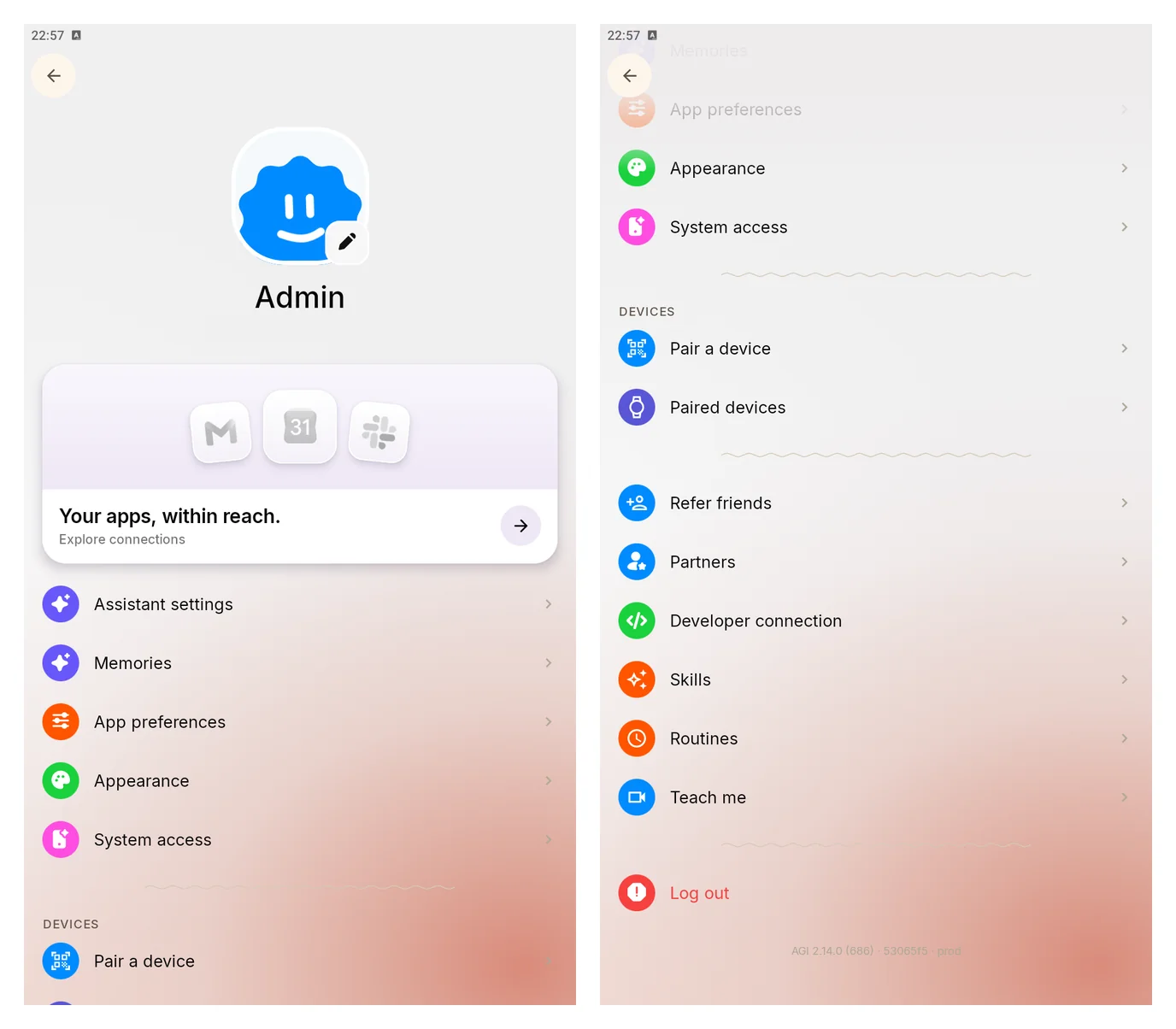
AGI settings: connections, memories, paired devices, and the MCP developer connection
Privacy, security, and limits before installing it
Airplane mode is real: at the Snapdragon Summit 2026, with the phone offline, the agent took a selfie and sent it by SMS running AGI-RUN on the NPU, without the photo leaving the device. But not everything is local. Its privacy policy contemplates collecting contacts, calendar, and mail and uploading them to servers, and mentions third-party AI providers such as OpenAI. Google Play declares it may collect financial information, encrypted in transit and not shared with third parties.
Three more limits. The Accessibility permission is like giving it eyes and hands over the whole screen: tap to pause it or disconnect the service when you are not using it; first review how to manage permissions and privacy on Android. The documentation itself warns about prompt injection: text in an email or a website is not an order from you. And in Play reviews, the most repeated complaint is occasional crashes. It is a young, ambitious app with well-designed brakes, but not infallible.
Sources
- AGI on Google Play
- Agentic Phone MCP documentation
- AGI-RUN: inference engine benchmarks
- AGI, Inc. privacy policy